PP-OCRv6 is the OCR model family used by Local Image to Text. It turns the pixels in a scan, photo, or screenshot into text that you can edit.
The tool uses the Small variants of the PP-OCRv6 detection and recognition models. They are compact enough to run in a browser, so the selected image does not need to be sent to an application recognition API. The browser downloads the model and runtime files on first use and can reuse cached copies later.
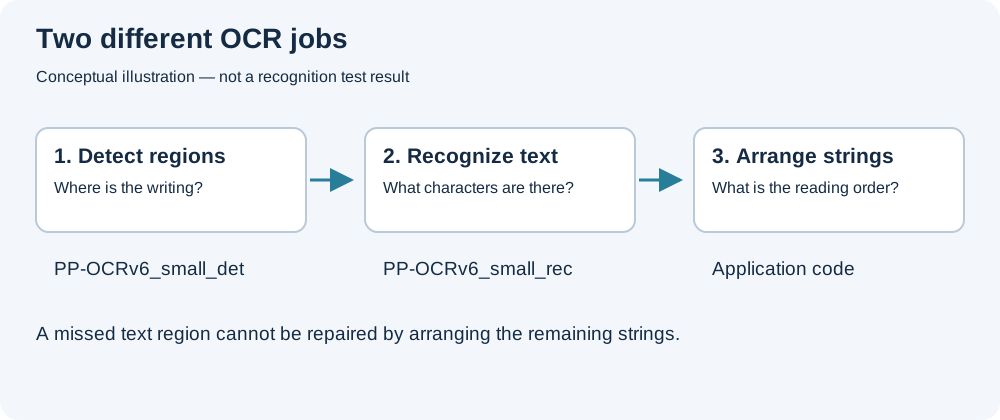
PP-OCRv6 is not one model doing one job. In this workflow, one model finds text regions and another reads the characters inside them. The application then puts the recognized strings into reading order.
Detection and recognition are separate steps
The local OCR pipeline has three practical stages:
[ Image ]
      ↓
PP-OCRv6_small_det → finds text regions
      ↓
PP-OCRv6_small_rec → reads the characters
      ↓
Application code → arranges the recognized lines
Text detection: PP-OCRv6_small_det
The detection model answers a location question: where is the text? It examines the image and returns regions around lines or words while ignoring as much of the background as possible.
This stage explains why glare, a clipped edge, or very small type can cause missing text. If the detector does not find a region, that region never reaches the recognition model. Cropping tightly can help, but the crop still needs to leave every character intact.
Text recognition: PP-OCRv6_small_rec
The recognition model receives each detected region and converts its visible strokes into characters, punctuation, and numbers. This is where errors such as 0 versus O or rn versus m usually appear. The shapes are similar when the source is blurred, compressed, or too small.
Detection and recognition do not decide the final paragraph order. After both models finish, the application uses the positions of the detected regions to arrange the strings. A page with sidebars or multiple columns can therefore contain correctly recognized words but still need manual reordering.
What Does "Small" Mean in Practice?
PP-OCRv6 is available in several sizes. This site uses PP-OCRv6_small_det and PP-OCRv6_small_rec, which are intended for constrained environments such as phones and desktop applications.
Here, "Small" describes the model tier rather than the physical dimensions of an input image. A smaller model is practical to download and run in a browser, though processing time still depends on the image, device, browser, and available hardware acceleration.
On the first run, the browser downloads the model weights and ONNX Runtime files from external CDNs. Recognition then runs on the device, using WebGPU when available and WebAssembly as a fallback. The model files may be cached, so later runs do not necessarily repeat the full download.
Which languages does PP-OCRv6 cover?
The Small recognition model covers 50 languages in one model. They consist of four core languages and 46 languages written in the Latin script:
| Official Group | Languages Included |
|---|---|
| Core languages | Simplified Chinese, Traditional Chinese, English, Japanese |
| Latin-script languages (46) | Afrikaans, Albanian, Azerbaijani, Basque, Bosnian, Catalan, Croatian, Czech, Danish, Dutch, Estonian, Finnish, French, Galician, German, Hungarian, Icelandic, Indonesian, Irish, Italian, Kurdish, Latin, Latvian, Lithuanian, Luxembourgish, Malay, Maltese, Maori, Norwegian, Occitan, Polish, Portuguese, Quechua, Romanian, Romansh, Serbian (Latin), Slovak, Slovenian, Spanish, Swahili, Swedish, Tagalog, Turkish, Uzbek, Vietnamese, Welsh |
Language coverage does not mean that every page will be read equally well. Font, character size, contrast, rotation, and image quality still affect the result. Mixed-language pages also deserve a careful review, especially around names, abbreviations, and punctuation.
Plain Text vs. Table Reconstruction
PP-OCRv6 can find and read the text in a table, but that does not by itself recover the table's rows, columns, or merged cells. Those are layout relationships rather than characters.
For spreadsheet-like output, Local Image to Table combines the PP-OCRv6 results with SLANet+, a separate model that predicts table structure. Application code then matches the recognized text to the predicted cells.
Preparing an image for OCR
A few ordinary image edits make a larger difference than the model name:
- Rotate the page so lines of text are horizontal.
- Crop away browser controls, desk surfaces, and other irrelevant areas.
- Keep enough resolution for small letters and punctuation to remain distinct.
- Check names, dates, decimal points, and product codes against the source.
For a normal text page, use Local Image to Text and edit the result before copying or downloading it. For a grid, use Local Image to Table instead. In either case, keep the source image nearby: OCR produces a useful draft, not a substitute for checking important details.
If accuracy matters more than keeping recognition entirely on the device, try AI Image to Table for spreadsheets and other tabular documents, or Image to Markdown for pages with headings, lists, tables, and mixed layouts. Both tools upload the image for processing by a server-side vision model, so use the local tools instead when the document cannot be sent to an external service.